# A Gallery media (Json) for Filament
[](https://packagist.org/packages/webplusm/gallery-json-media)
[](https://github.com/webplusmultimedia/filament-json-media/actions?query=workflow%3Arun-tests+branch%3Amain)
[](https://packagist.org/packages/webplusm/gallery-json-media)
This package add a json field media for images/documents to filament V3.x and fluents api for front-end in Laravel to display photos and url link for documents ...
[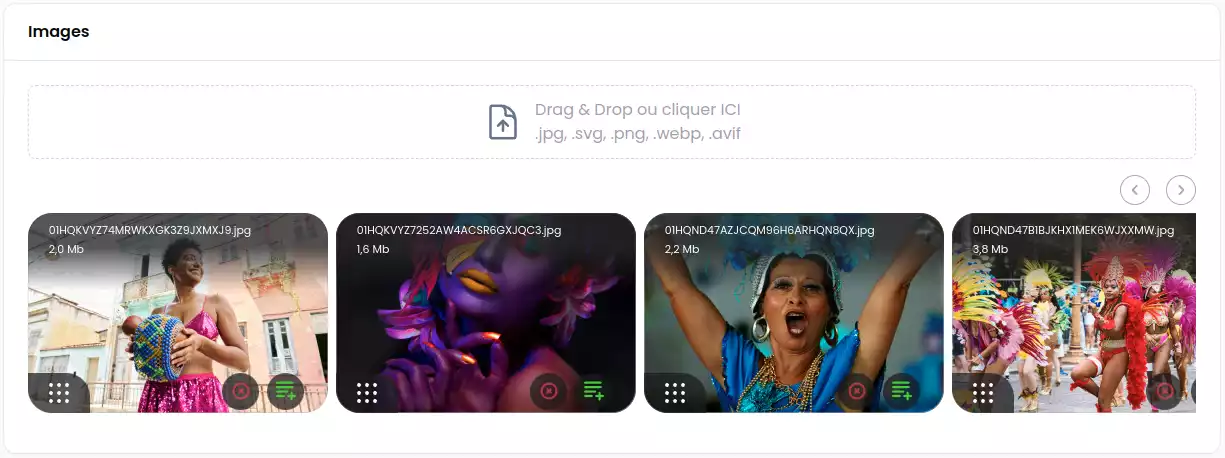](https://postimg.cc/wtLMvcK9)
V2.x Use now spatie/image package (^PHP 8.2 need)
## Installation
You can install the package via composer:
```bash
composer require webplusm/gallery-json-media
```
You can publish the config file with:
```bash
php artisan vendor:publish --tag="gallery-json-media-config"
```
Optionally, you can publish the views using
```bash
php artisan vendor:publish --tag="gallery-json-media-views"
```
## Discord
Find it on [discord](https://discord.com/channels/883083792112300104/1220043851977199616)
## Usage
### Prepare your model
```php
use GalleryJsonMedia\JsonMedia\Concerns\InteractWithMedia;
use GalleryJsonMedia\JsonMedia\Contracts\HasMedia;
class Page extends Model implements HasMedia
{
use HasFactory;
use InteractWithMedia;
protected $casts =[
'images' => 'array',
'documents' => 'array',
];
// for auto-delete media thumbnails
protected function getFieldsToDeleteMedia(): array {
return ['images','documents'];
}
...
}
```
### In Filament Forms
```php
use GalleryJsonMedia\Form\JsonMediaGallery;
JsonMediaGallery::make('images')
->directory('page')
->reorderable()
->preserveFilenames()
->acceptedFileTypes()
->visibility() // only public for now - NO S3
->maxSize(4 * 1024)
->minSize()
->maxFiles()
->minFiles()
->replaceNameByTitle() // If you want to show title (alt customProperties) against file name
->image() // only images by default , u need to choose one (images or document)
->document() // only documents (eg: pdf, doc, xls,...)
->downloadable()
->deletable()
->withCustomProperties(
customPropertiesSchema: [
...
],
editCustomPropertiesOnSlideOver: true,
editCustomPropertiesTitle: "Edit customs properties")
```
### In Filament Tables

```php
use GalleryJsonMedia\Tables\Columns\JsonMediaColumn;
JsonMediaColumn::make('images')
->avatars(bool|Closure)
```
### In Filament Infolists
```php
use GalleryJsonMedia\Infolists\JsonMediaEntry;
use GalleryJsonMedia\Infolists\JsonDocumentsEntry;
JsonMediaEntry::make('images')
->avatars()
->thumbHeight(100)
->thumbWidth(100)
->visible(static fn(array|null $state)=> filled($state))
// or for Documents, you can download them here
GalleryJsonMedia\Infolists\JsonDocumentsEntry::make('documents')
->columns(4)
->columnSpanFull()
```
### In Blade Front-end
```html
@foreach($page->getMedias('images') as $media)
{{ $media }}
@endforeach
@foreach($page->getDocuments('documents') as $document)
```
You can also control the entire view to render the media by passing a blade file to your view like this :
```html
@foreach($page->getMedias('images') as $media)
@endforeach
@php
use GalleryJsonMedia\JsonMedia\Media;
/** @var Media $media*/
$media
@endphp
```
## Testing
```bash
composer test
```
## Changelog
Please see [CHANGELOG](CHANGELOG.md) for more information on what has changed recently.
## Contributing
Please see [CONTRIBUTING](.github/CONTRIBUTING.md) for details.
## Security Vulnerabilities
Please review [our security policy](https://github.com/webplusmultimedia/filament-json-media/security/policy) on how to report security vulnerabilities.
## Credits
- [webplusm](https://github.com/webplusmultimedia)
## License
The MIT License (MIT). Please see [License File](LICENSE.md) for more information.